The PvPStats Addon
Your armory shows ratings. This shows the games — every rated arena and Solo Shuffle match you play, with the full scoreboard, saved to your PvPStats profile.
Hover any player — out in the world, on your friends list, the guild roster or the group finder — and PvPStats adds their title history right into the tooltip: career totals plus the highest rank they hit each recent season.
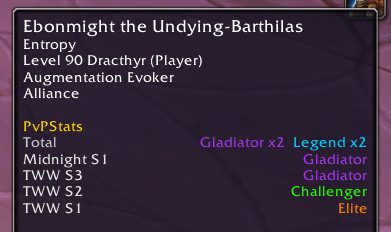
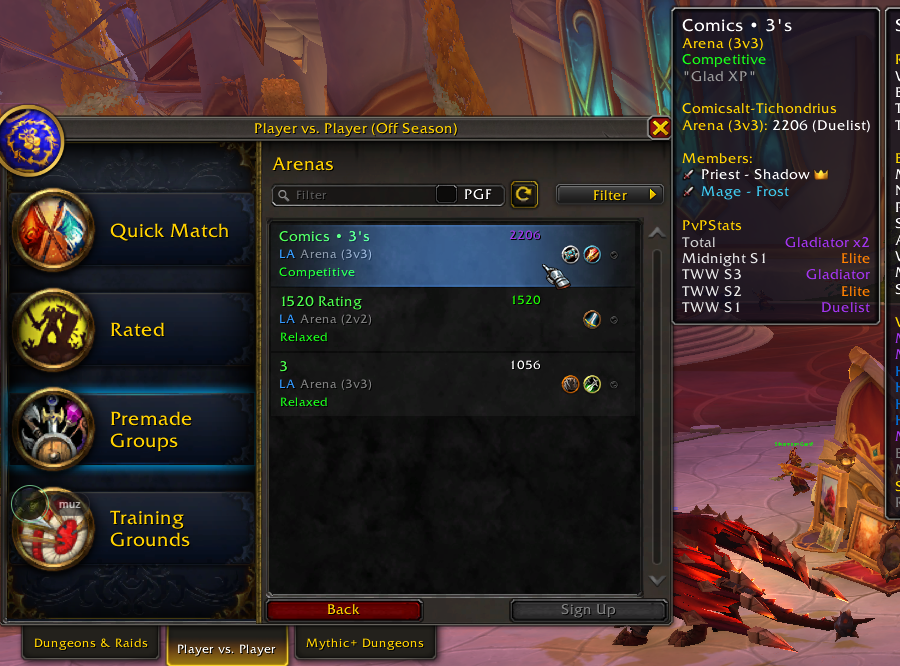
Install the addon
A lightweight in-game addon records the scoreboard at the end of every rated match. No setup, no configuration.
Play rated games
2v2, 3v3 and Solo Shuffle are captured automatically — result, comp, damage, healing, kills and rating changes for all players in the match.
One click sync
The companion uploader sends new matches to pvpstats.com in the background. Press go once — your profile stays up to date.
Match history
A running list of your games: result, map, comp vs comp, duration and rating change.
Full scoreboards
Expand any match to see damage, healing, kills and deaths for all six players — both teams.
Rating graph
Your climb, game by game — not just the weekly snapshots the armory gives you.
Solo Shuffle rounds
Round-by-round wins for every lobby, per player — the detail the in-game UI throws away.
Install the addon
Get PvPStats from CurseForge (or the CurseForge app) and enable it in your in-game AddOns list. You should end up with:
World of Warcraft\_retail_\Interface\AddOns\PvPStats\PvPStats.tocAdd the uploader
Download the uploader above and unzip its uploader folder into that same PvPStats addon folder, so you have:
World of Warcraft\_retail_\Interface\AddOns\PvPStats\uploader\pvpstats-uploader.exeRun it
Double-click pvpstats-uploader.exe. If Windows warns you, click More info → Run anyway. It's already set up — nothing to configure.
Matches upload automatically a few seconds after each /reload or logout. Tick “Start with Windows” to keep it running quietly in the background.